Fix CAPTCHA Loop After Verification
Why Am I Stuck in a CAPTCHA Loop Even After Verification?
If you have successfully completed the CAPTCHA verification but are still being prompted again, this is a known behavior related to DNS caching on your server.
Root Cause
cPGuard uses the ModSecurity DNSBL (DNS-based Blocklist) option to validate the reputation of the client's IP address. This process relies on DNS queries, and the responses are sent with a 10-second TTL (Time To Live).
On some systems, this TTL is not respected and the DNS response is cached for longer than expected. As a result, the reputation status takes more time to reflect, causing repeated CAPTCHA verification prompts.
CAPTCHA Versions in cPGuard
cPGuard provides two CAPTCHA versions to address this issue. Understanding the difference will help you choose the right option for your environment.
CAPTCHA V1 (Legacy) — Recommended by Default
The legacy CAPTCHA option is the recommended default for most users. It is:
- Lightweight and simple
- Does not require any additional components or binary execution
- Sufficient for the majority of server environments
If your server uses reliable open name servers that respect DNS TTLs, V1 will work without any issues.
CAPTCHA V2 — Optional, for DNS Caching Issues
CAPTCHA V2 is an advanced option designed specifically for servers that experience DNS caching issues with V1. It works by:
- Bypassing DNS caching by sending the query through a binary
- Adding an additional verification layer to the CAPTCHA system
However, V2 comes with trade-offs:
- More resource-intensive than V1
- Involves binary execution, making it less lightweight
- Adds complexity compared to the simpler V1 ruleset
V2 is recommended only if you are experiencing a CAPTCHA loop with the legacy (V1) option. It is not intended as a replacement for V1 in standard environments.
How to Fix the CAPTCHA Loop
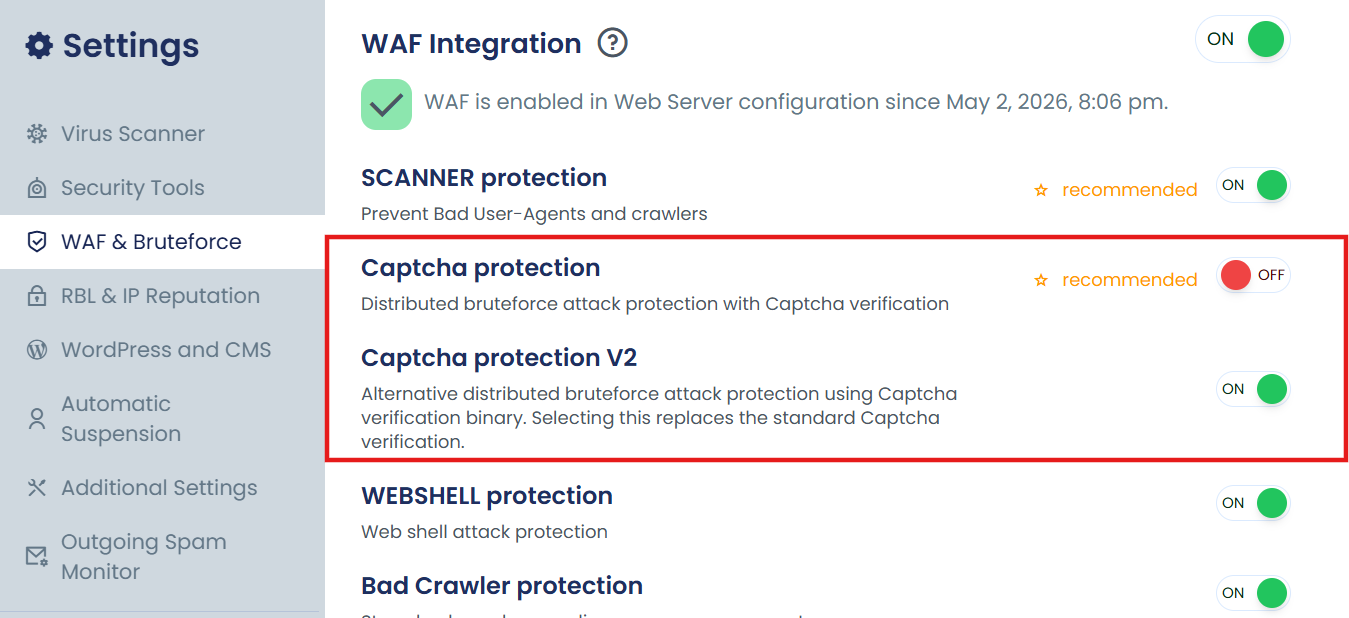
Enable CAPTCHA V2
Switch to CAPTCHA V2 to bypass the DNS caching issue.
To enable CAPTCHA V2, navigate to:
App Portal >> Settings >> WAF & Bruteforce >> Captcha protection V2
If you continue to experience issues after trying both options, please contact our support team for further assistance.