Accounts Limit Exceeded Error
The "Allowed Accounts Limit Exceeded " or "License instance limit exceeded" error typically appears on servers using a Standard License when the number of users on the server exceeds the permitted limit.
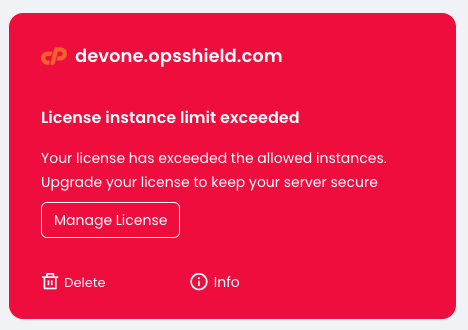
cPGuard offers two license types:
- Standard License – Valid for up to 50 users on a server.
- Unlimited License – No limit on the number of users.
Since cPGuard supports multiple hosting control panels and platforms, the user count is determined based on the number of normal system users present on the server, regardless of the number of users shown in the hosting control panel.
How to Resolve the Error
You can resolve this issue using one of the following methods:
Option 1: Reduce the User Count
List the users on the server and remove any unwanted or inactive users to bring the total user count below 50.
Option 2: Upgrade to an Unlimited License
Purchase and apply an Unlimited License to the server. Once the new license is active, you may cancel the existing Standard License.
Note: There is currently no direct upgrade path from a Standard License to an Unlimited License. A new Unlimited License must be purchased and applied separately.
How User Count Is Calculated
To determine the number of users on your server, run the following command:
/usr/bin/awk -F '[/:]' '{if ($3 >= 1000 && $3 < 60000 && $3 != 65534) print $1}' '/etc/passwd' | grep -v 'cpguard\|centos\|clamav\|magicspam\|cldiaguser\|ubuntu\|cyberpanel\|docker\|ftpuser\|lscpd' 2>&1 | /usr/bin/wc -l
View the List of Counted Users
To display the users included in the license count, run:
/usr/bin/awk -F '[/:]' '{if ($3 >= 1000 && $3 < 60000 && $3 != 65534) print $1}' '/etc/passwd' | grep -v 'cpguard\|centos\|clamav\|magicspam\|cldiaguser\|ubuntu\|cyberpanel\|docker\|ftpuser\|lscpd'
Need Assistance?
If you need any assistance resolving this issue, please feel free to contact our support team.