Data, privacy and security
Security and data privacy are central to how the cPGuard App Portal is designed. This page explains exactly what data is stored in the portal, what stays exclusively on your server, how communication is encrypted, and what access OpsShield support has to your infrastructure.
All critical data including cPGuard logs and privileged information related to domains and users is stored on your own servers and fetched on demand via APIs when you open the App Portal.
Login and Access
Access to the App Portal is restricted to:
- The license owner of the cPGuard subscription
- Any additional users the license owner has explicitly granted access to
Authentication uses Single Sign-On (SSO) linked to your OpsShield billing account. Sensitive customer details such as usernames, passwords, billing addresses, and payment information are stored separately on OpsShield's management and billing servers. Hence it is completely isolated from the App Portal backend.
What Data is Stored in the App Portal
The App Portal backend is designed with a minimal data storage principle, only information that is strictly necessary to power the consolidated dashboard and server list is retained.
Data Stored in the Portal
| Data Type | Why It Is Stored |
|---|---|
| Attack statistics summary | Required to display consolidated dashboards and reports across multiple servers efficiently |
| Server IP address | To identify and connect to individual servers |
| Hostname | Displayed in the server list for identification |
| Operating system | Shown in the server overview |
| cPGuard module statuses | Displayed on the dashboard (e.g., WAF enabled, scanner active) |
| Number of domains | Shown as a summary metric in the server list |
This is essentially the information visible on the dashboard and server list pages within the portal — nothing beyond what is needed to render those views.
What is Never Stored in the App Portal
OpsShield explicitly does not store the following in the portal:
- Domain names hosted on your servers
- Additional IP addresses beyond the primary server IP
- Client IP addresses or browser information
- Scanner and security logs
- WAF logs, bot attack logs, or IPDB entries
- Any other sensitive or personally identifiable information
All of this data remains on your server and is loaded on demand via the agent service when you navigate to the relevant section in the portal.
How the Agent Service Works
The cPGuard agent service is a lightweight process running on your server that acts as the data source for everything the portal displays. Key characteristics:
- Runs as a standard (non-root) user — not with elevated privileges
- Uses a custom Nginx instance dedicated to cPGuard operations
- Accepts only pre-defined API procedures — it cannot be instructed to perform arbitrary operations
- All cPGuard data (logs, scan results, WAF events, etc.) is stored on your server and served via the agent on demand
Agent Port and Access Control The agent service runs on a custom port and is not open to the public internet. Only the IP addresses of OpsShield's cloud servers are permitted to communicate with it. You will need to whitelist these IPs on your server's firewall.
Communication Security Between the Portal and Your Server
The browser does not communicate directly with the agent service on your server. The communication flow is as follows:
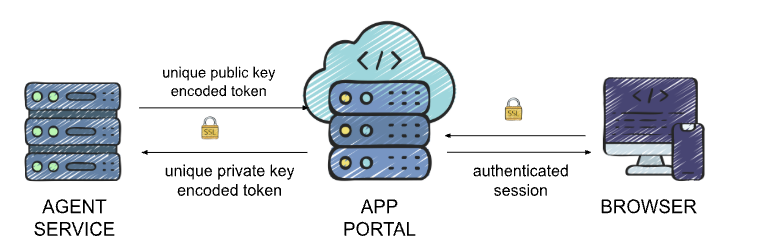
| Measure | Detail |
|---|---|
| Transport encryption | All API requests between the portal backend and the agent are sent over HTTPS |
| Public/private key encryption | Requests are encrypted end-to-end using asymmetric key pairs |
| Unique keys per server | Every server and license uses its own unique private/public key pair — no shared keys |
| No direct browser-to-agent communication | The portal backend acts as a secure intermediary, preventing direct exposure of the agent |
These layers ensure that even if traffic were intercepted, it could not be decrypted or used to make unauthorised requests to your server.
Support Access
OpsShield support staff have no access to your servers by default. Access is only possible when:
- You explicitly grant support access through the portal's support option
- Access details are available only to higher-level support agents
- Stored access credentials are automatically cleared after a fixed time interval, or immediately when you manually revoke access
This means you remain in full control of when and for how long OpsShield can access your server for troubleshooting.
Data Privacy Summary
| Aspect | Approach |
|---|---|
| Data stored in portal | Minimal — only summary stats and basic server metadata |
| Sensitive logs and data | Always on your server, never in the portal |
| Authentication | SSO with OpsShield billing account; customer data stored separately |
| Agent communication | HTTPS + per-server public/private key encryption |
| Agent access | Restricted to OpsShield cloud IPs; not publicly accessible |
| Support access | Opt-in only; time-limited and revocable |
Summary
The cPGuard App Portal is architected around a clear principle: your sensitive server data stays on your server. The portal stores only the minimum information required to provide a useful multi-server dashboard, while all logs, domain data, and security events are fetched securely on demand. Multiple layers of encryption and access controls ensure that both your data and your servers remain protected.
For a deeper dive into the security architecture, see Security Architecture.